
How to Deposit on PHOPEN – Step-by-Step Guide for First-Time Users

This guide shows you how to deposit on PHOPEN step by step in a clear and simple way.
If you are depositing for the first time, follow the instructions below to avoid common mistakes and make sure your funds are credited successfully.
What You Need Before Making a Deposit
Before starting the deposit process, make sure you have:
- An active PHOPEN account
- Access to your PHOPEN dashboard (logged in)
- A personal payment method such as GCash, Maya, or a local bank account
- A stable internet connection
Step-by-Step Guide to Deposit on PHOPEN
Step 1 – Log In to Your PHOPEN Account
Visit the official PHOPEN website and log in using your registered username and password.
Always double-check the website address before entering your details.
Step 2 – Open the Deposit Section
After logging in, go to your account dashboard and click on the Deposit option.
This will open the secure deposit interface.
Step 3 – Choose a Payment Method
Select the payment method you want to use.
PHOPEN supports several local options, including e-wallets and bank transfers.
Step 4 – Enter the Deposit Amount
Enter the amount you wish to deposit and carefully review the information shown on screen.
Make sure all details are correct before confirming.
Step 5 – Complete the Payment
Follow the on-screen instructions to complete the transaction using your selected payment method.
Do not close the page until you see the confirmation message.
Step 6 – Check Your Wallet Balance
Once the payment is successful, the funds should appear in your PHOPEN wallet.
You can verify this by checking your balance or transaction history.
Example: How to Deposit Using GCash
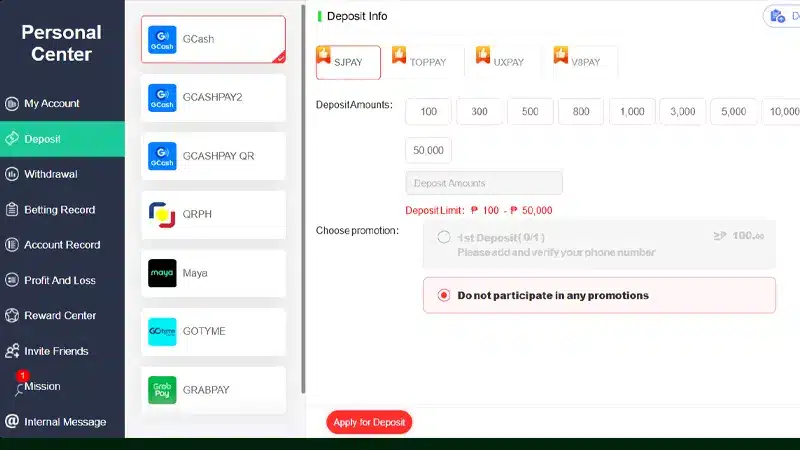
GCash is one of the most popular payment methods for Filipino players.
Here is a simple overview of how a GCash deposit usually works:
- Select GCash as your deposit option
- Enter your desired deposit amount
- Confirm the transaction in your GCash app
- Wait for the payment confirmation
For a more detailed walkthrough with screenshots, you can read the full guide on
how to deposit on PHOPEN using GCash.
How Long Does a PHOPEN Deposit Take?
Most PHOPEN deposits are processed quickly.
In many cases, funds are credited within a few minutes.
However, processing time may vary depending on your payment method and network conditions.
Common Deposit Mistakes to Avoid
- Using someone else’s e-wallet or bank account
- Entering incorrect payment details
- Sending money outside the official deposit page
- Closing the payment page too early
Avoiding these mistakes helps ensure your deposit is completed smoothly.
What to Do If Your Deposit Does Not Reflect
If your deposit does not appear in your wallet:
- Check the transaction status in your payment app
- Refresh your PHOPEN dashboard
- Wait a few minutes for system updates
- Contact customer support if the issue persists
Frequently Asked Questions – How to Deposit on PHOPEN
Is this guide suitable for first-time users?
Can I try again if my deposit fails?
Do I need to deposit before playing?
Next Step: Visit the Official Deposit Page
This guide explains the deposit process step by step.
For full details about payment options, limits, and promotions, visit the official page below.
